UNIT I RELATIONAL DATABASES
1.10 Advanced SQL Features
key features of Structured Query Language (SQL):
- Data Definition Language (DDL): SQL provides a set of commands to define and modify the structure of a database, including creating tables, modifying table structure, and dropping tables.
- Data Manipulation Language (DML): SQL provides a set of commands to manipulate data within a database, including adding, modifying, and deleting data.
- Query Language: SQL provides a rich set of commands for querying a database to retrieve data, including the ability to filter, sort, group, and join data from multiple tables.
- Transaction Control: SQL supports transaction processing, which allows users to group a set of database operations into a single transaction that can be rolled back in case of failure.
- Data Integrity: SQL includes features to enforce data integrity, such as the ability to specify constraints on the values that can be inserted or updated in a table, and to enforce referential integrity between tables.
- User Access Control: SQL provides mechanisms to control user access to a database, including the ability to grant and revoke privileges to perform certain operations on the database.
- Portability: SQL is a standardized language, meaning that SQL code written for one database management system can be used on another system with minimal modification.
Overall, SQL provides a powerful set of tools for managing and querying relational databases, making it a popular choice for data management tasks.
Structured Query Language (SQL) is the standard language used for writing queries in a databases. It was approved by ISO (International Standard Organization) and ANSI(American National Standards Institute).
SQL contains of some important features and they are:
- Data Definition language (DDL):
It contains of commands which defines the data. The commands are:
- create: It is used to create a table.
Syntax:
create table
tablename(attribute1 datatype......attributen datatype); - drop: It is used to delete the table including all the attributes.
Syntax:
drop table tablename; - alter: alter is a reserve word which modifies the structure of the table.
Syntax:
alter table
tablename add(new column1 datatype......new columnx datatype); - rename: A table name can be changed using the reserver 'rename'
Syntax:
rename old table name to new table name; 2. Data Manipulation Language (DML):
Data Manipulation Language contains commands used to manipulate the data.
The commands are:
- insert: This command is generally used after the create command to insert a set of values into the table.
Syntax:
insert into tablename values(attribute1 datatype);
:
:
:
insert into tablename values (attributen datatype); - delete: A command used to delete particular tuples or rows or cardinality from the table.
Syntax:
delete from tablename where condition; - update: It updates the tuples in a table.
Syntax:
update tablename set tuplename='attributename'; - Triggers:
Triggers are actions performed when certain conditions are met on the data.
A trigger contains of three parts.- (i). event - The change in the database that activates the trigger is event.
- (ii). condition - A query or test that is run when the trigger is activated.
- (iii). action - A procedure that is executed when trigger is activated and the condition met is true.
- (i). event - The change in the database that activates the trigger is event.
2. Client server execution and remote database access:
Client server technology maintains a many to one relationship of clients(many) and server(one). We have commands in SQL that control how a client application can access the database over a network.
3. Security and authentication:
SQL provides a mechanism to control the database meaning it makes sure that only the particular details of the database is to be shown the user and the original database is secured by DBMS.
4. Embedded SQL:
SQL provides the feature of embedding host languages such as C, COBOL, Java for query from their language at runtime.
5. Transaction Control Language:
Transactions are an important element of DBMS and to control the transactions, TCL is used which has commands like commit, rollback and savepoint.
- commit: It saves the database at any point whenever database is consistent.
Syntax:
commit; - rollback: It rollbacks/undo to the previous point of the transaction.
Syntax:
rollback; - savepoint: It goes back to the previous transaction without going back to the entire transaction.
Syntax:
savepoint; 6. Advanced SQL:
The current features include OOP ones like recursive queries, decision supporting queries and also query supporting areas like data mining, spatial data and XML(Xtensible Markup Language).
• The programing module in which the SQL Statements are embedded is called Embedded SQL module.
• It is possible to embed SQL statements inside the programming language such as C, C++, PASCAL,Java and so on.
• It allows the application languages to communicate with DB and get requested result.
• The high level languages which supports embedding SQLS within it are also known as host language.
• An embedded SQL program must be processed by a special preprocessor prior to compilation. The preprocessor replaces embedded SQL requests with host-language declarations and procedure calls that allow runtime execution of the database accesses. Then, the resulting program is compiled by the host-language compiler. This is the main distinction between embedded SQL and JDBC or ODBC.
Example of Embedded SQL - Following program prompts the user for an order number,
retrieves the customer number, salesperson, and status of the order, and displays the retrieved information on the screen.
int main() {
EXEC SOL INCLUDE SOLCA;
EXEC SOL BEGIN DECLARE SECTION;
int OrderID;/* Employee ID (from user) */
int CustID;/* Retrieved customer ID */
char SalesPerson[10] /* Retrieved salesperson name */
char Status[6]/* Retrieved order status */
EXEC SOL END DECLARE SECTION;
/* Set up error processing */
EXEC SOL WHENEVER SOLERROR GOTO query_error;
EXEC SOL WHENEVER NOT FOUND GOTO bad_number;
/* Prompt the user for order number */
printf ("Enter order number: ");
scanf_s("%d", &OrderID);
/* Execute the SQL query */
EXEC SOL SELECT CustID, SalesPerson, Status
FROM Orders
WHERE OrderID = :OrderID
INTO:CustID, :SalesPerson, :Status;
/* Display the results */
printf ("Customer number: %d\n", CustID);
printf ("Salesperson: %s\n", SalesPerson);
printf ("Status: %s\n", Status);
exit():
query_error:
printf ("SQL error: %ld\n", sqlca->sqlcode);
exit();
bad_number:
printf ("Invalid order number.\n");
exit();
}
Features of Embedded SQL
(1) It is easy to use.
(2) It is ANSI/ISO standard programming language.
(3) It requires less coding
(4) The precompiler can optimize execution time by generating stored procedures for the Embedded SQL statements.
(5) It is identical over different host languages, hence writing applications using different programming languages is quite easy.
1.12 Dynamic SQL
What is Dynamic SQL ?
Dynamic SQL is the SQL statement that is being formed dynamically during runtime at the time of the execution of the SQL statement. It’s not being hardcoded in the code in the application.
So, it runs dynamically based on the user inputs and the changing conditions and thus allows more flexibility in the execution of the queries.
steps involved in Dynamic SQL :
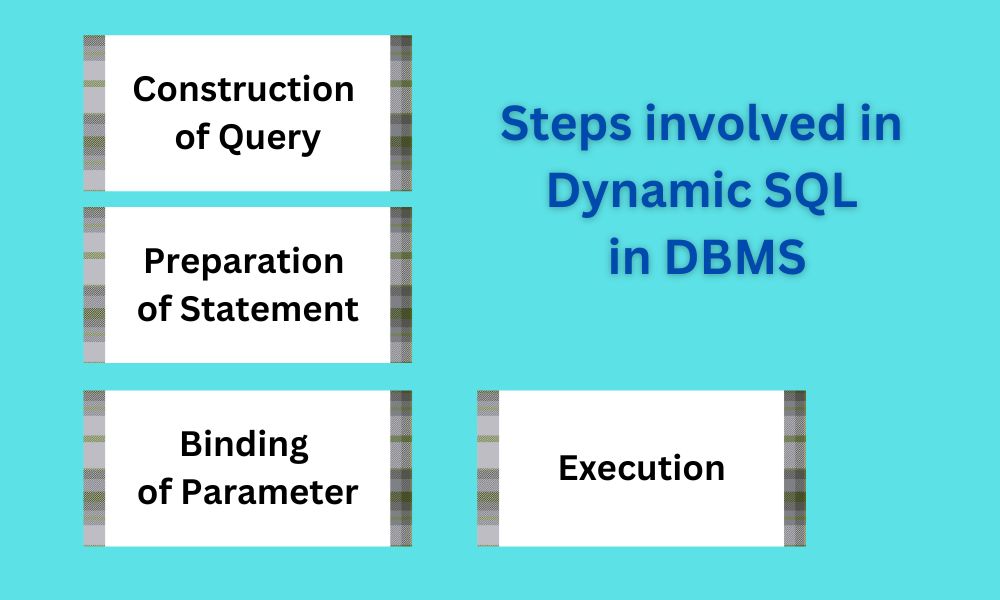
Dynamic SQL in DBMS typically follows the following steps:
- Construction of Query: In the Programming language, the SQL statement is dynamically constructed as a string, and is used to interface with DBMS. So, it involves the addition of conditional logic, concatenation of the strings, or simply using the variables to generate the SQL statement.
- Preparation of Statement: DBMS is responsible for the preparation and compilation of Dynamic SQL in DBMS. This step is used to parse and validate the syntax of the SQL, also before executing the query, check the permission of the user who is executing the query.
- Binding of Parameter: If the parameter values are used to prepare the SQL statements, this is basically with the parameterized queries. It is used for performance and security reasons. This makes the query more efficient as it uses the same compiled statement again, and helps in preventing SQL injections.
- Execution: The execution of the parameterized and the prepared SQL is being done., and the result for the same is to call the application. It is the responsibility of the DBMS to handle the optimization of queries, data retrieval, and any modifications required further.
Dynamic SQL in DBMS is used where the content or the structure of the SQL query needs to adapt dynamically. The functionality which makes this implemented are:
- Complex reports generation with variable filtering conditions.
- Search functionality to be implemented with dynamic search criteria
- creation of a flexible database.
Need for dynamic SQL in DBMS:
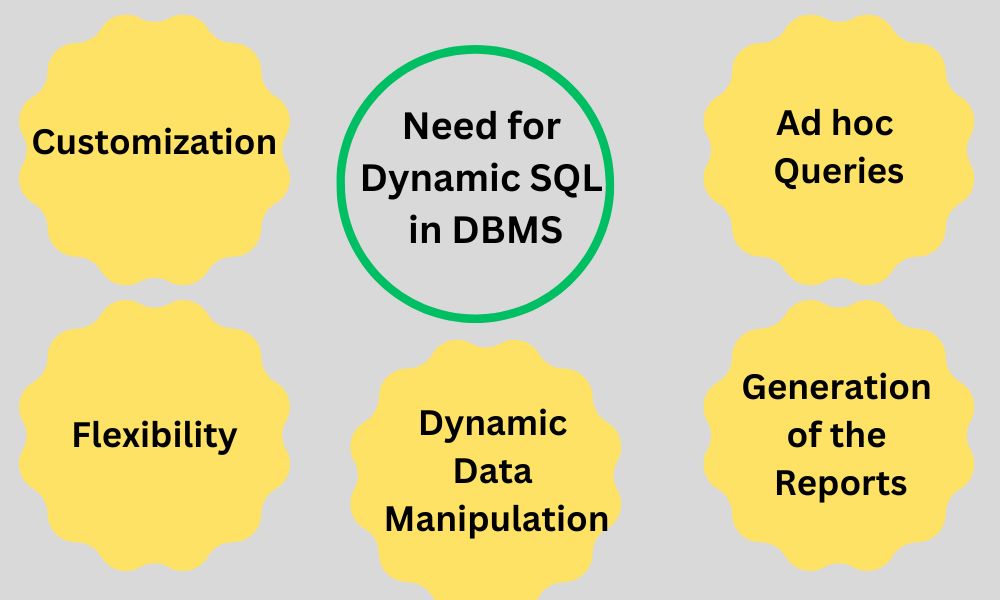
There are lots of use cases which involved dynamic SQL in DBMS, and some of them are:
- Customization: Based on the application settings and user preferences, Dynamic SQL in DBMS allows the customization of queries. Basically, through this, the user will able to specify different sorting options and multiple search criteria, and thus it results in much tailored and personalized query results.
- Flexibility: Since Dynamic SQL in DBMS allows queries to adapt to the dynamically changing users’ inputs and various conditions, it becomes more flexible and the execution is much faster and easier. It allows the queries to be constructed during runtime conditions.
- Dynamic Data Manipulation: Dynamic SQL in DBMS also allows the data to be manipulated dynamically. Statements like INSERT, DELETE, and UPDATE can be executed dynamically based on certain application logic and user actions.
- Ad hoc Queries: If the content or structure of the queries is not known in advance, then Dynamic SQL in DBMS is very useful. It allows the users to prepare and construct the query on the fly, thus giving them more control and freedom over the retrieval of the data.
- Generation of the Reports: Dynamic SQL in DBMS is often used in report generation. As it allows the preparation of the reports dynamically with a variety of filters, grouping, sorting, and aggregation options.

Comments
Post a Comment