UNIT I RELATIONAL DATABASES
1.7 Keys
In the context of a relational database, keys are one of the basic requirements of a relational database model.
- Keys are fundamental components that ensure data integrity, uniqueness and efficient access. It is widely used to identify the tuples(rows) uniquely in the table.
- We also use keys to set up relations amongst various columns and tables of a relational database.

Why do we require Keys in a DBMS?
Keys are important in a Database Management System (DBMS) for several reasons:
- Uniqueness: Keys ensure that each record in a table is unique and can be identified distinctly.
- Data Integrity: Keys prevent data duplication and maintain the consistency of the data.
- Efficient Data Retrieval: By defining relationships between tables, keys enable faster querying and better data organization. Without keys, it would be extremely difficult to manage large datasets and queries would become inefficient and prone to errors.
Types of Database Keys
1. Super Key
The set of one or more attributes (columns) that can uniquely identify a tuple (record) is known as Super Key. It may include extra attributes that aren't important for uniqueness but still uniquely identify the row. For Example, STUD_NO, (STUD_NO, STUD_NAME), etc.
- A super key is a group of single or multiple keys that uniquely identifies rows in a table. It supports NULL values in rows.
- A super key can contain extra attributes that aren’t necessary for uniqueness.
- For example, if the "STUD_NO" column can uniquely identify a student, adding "SNAME" to it will still form a valid super key, though it's unnecessary.
Example: Consider the STUDENT table
| STUD_NO | SNAME | ADDRESS | PHONE |
|---|---|---|---|
| 1 | Shyam | Delhi | 123456789 |
| 2 | Rakesh | Kolkata | 223365796 |
| 3 | Suraj | Delhi | 175468965 |
A super key could be a combination of STUD_NO and PHONE, as this combination uniquely identifies a student.

2. Candidate Key
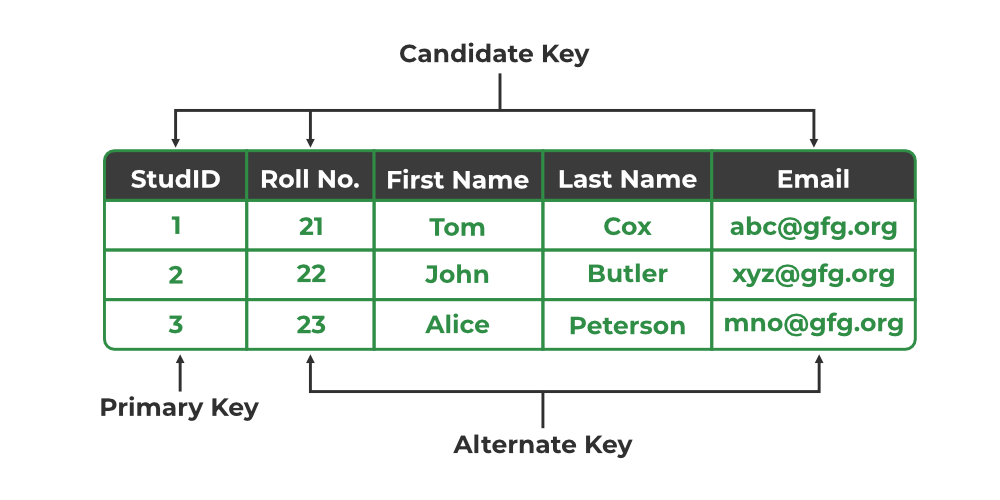
The minimal set of attributes that can uniquely identify a tuple is known as a candidate key. For Example, STUD_NO in STUDENT relation.
- A candidate key is a minimal super key, meaning it can uniquely identify a record but contains no extra attributes.
- It is a super key with no repeated data is called a candidate key.
- The minimal set of attributes that can uniquely identify a record.
- A candidate key must contain unique values, ensuring that no two rows have the same value in the candidate key’s columns.
- Every table must have at least a single candidate key.
- A table can have multiple candidate keys but only one primary key.
Example: For the STUDENT table below, STUD_NO can be a candidate key, as it uniquely identifies each record.
| STUD_NO | SNAME | ADDRESS | PHONE |
|---|---|---|---|
| 1 | Shyam | Delhi | 123456789 |
| 2 | Rakesh | Kolkata | 223365796 |
| 3 | Suraj | Delhi | 175468965 |
Table: STUDENT_COURSE
| STUD_NO | TEACHER_NO | COURSE_NO |
|---|---|---|
| 1 | 001 | C001 |
| 2 | 056 | C005 |
A composite candidate key example: {STUD_NO, COURSE_NO} can be a candidate key for a STUDENT_COURSE table.
3. Primary Key
There can be more than one candidate key in relation out of which one can be chosen as the primary key. For Example, STUD_NO, as well as STUD_PHONE, are candidate keys for relation STUDENT but STUD_NO can be chosen as the primary key (only one out of many candidate keys).
- A primary key is a unique key, meaning it can uniquely identify each record (tuple) in a table.
- It must have unique values and cannot contain any duplicate values.
- A primary key cannot be NULL, as it needs to provide a valid, unique identifier for every record.
- A primary key does not have to consist of a single column. In some cases, a composite primary key (made of multiple columns) can be used to uniquely identify records in a table.
- Databases typically store rows ordered in memory according to primary key for fast access of records using primary key.
Example:
STUDENT table -> Student(STUD_NO, SNAME, ADDRESS, PHONE) , STUD_NO is a primary key
Table: STUDENT
| STUD_NO | SNAME | ADDRESS | PHONE |
|---|---|---|---|
| 1 | Shyam | Delhi | 123456789 |
| 2 | Rakesh | Kolkata | 223365796 |
| 3 | Suraj | Delhi | 175468965 |
4. Alternate Key
An alternate key is any candidate key in a table that is not chosen as the primary key. In other words, all the keys that are not selected as the primary key are considered alternate keys.
- An alternate key is also referred to as a secondary key because it can uniquely identify records in a table, just like the primary key.
- An alternate key can consist of one or more columns (fields) that can uniquely identify a record, but it is not the primary key
Example: In the STUDENT table, both STUD_NO and PHONE are candidate keys. If STUD_NO is chosen as the primary key, then PHONE would be considered an alternate key.
5. Foreign Key
A foreign key is an attribute in one table that refers to the primary key in another table. The table that contains the foreign key is called the referencing table and the table that is referenced is called the referenced table.
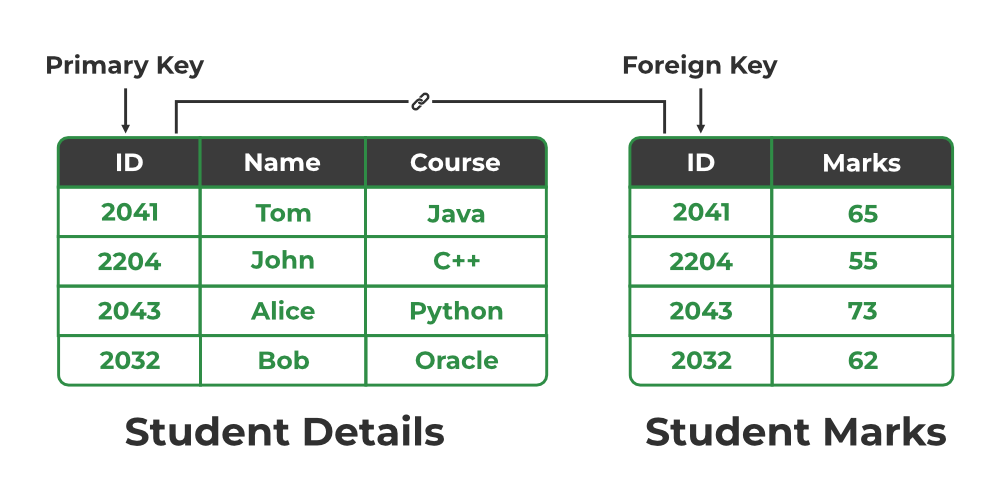
- A foreign key in one table points to the primary key in another table, establishing a relationship between them.
- It helps connect two or more tables, enabling you to create relationships between them. This is important for maintaining data integrity and preventing data redundancy.
- They act as a cross-reference between the tables.
Example: Consider the STUDENT_COURSE table
| STUD_NO | TEACHER_NO | COURSE_NO |
|---|---|---|
| 1 | 005 | C001 |
| 2 | 056 | C005 |
Explanation:
- Here, STUD_NO in the STUDENT_COURSE table is a foreign key that references the STUD_NO primary key in the STUDENT table.
- Unlike the Primary Key of any given relation, Foreign Key can be NULL as well as may contain duplicate tuples i.e. it need not follow uniqueness constraint. For Example, STUD_NO in the STUDENT_COURSE relation is not unique.
- It has been repeated for the first and third tuples. However, the STUD_NO in STUDENT relation is a primary key and it needs to be always unique and it cannot be null.
6. Composite Key
Sometimes, a table might not have a single column/attribute that uniquely identifies all the records of a table. To uniquely identify rows of a table, a combination of two or more columns/attributes can be used. It still can give duplicate values in rare cases. So, we need to find the optimal set of attributes that can uniquely identify rows in a table.
- It acts as a primary key if there is no primary key in a table
- Two or more attributes are used together to make a composite key .
- Different combinations of attributes may give different accuracy in terms of identifying the rows uniquely.
Example: In the STUDENT_COURSE table, {STUD_NO, COURSE_NO} can form a composite key to uniquely identify each record.

Relational Algebra is a formal language used to query and manipulate relational databases, consisting of a set of operations like selection, projection, union, and join. It provides a mathematical framework for querying databases, ensuring efficient data retrieval and manipulation.
- Relational algebra serves as the mathematical foundation for query SQL.
- SQL queries are based on relational algebra operations, enabling users to retrieve data effectively.
Note: Relational algebra simplifies the process of querying databases and makes it easier to understand and optimize query execution for better performance. It is essential for learning SQL
Key Concepts in Relational Algebra
Before explaining relational algebra operations, let's define some fundamental concepts:
- Relations: In relational algebra, a relation is a table that consists of rows and columns, representing data in a structured format. Each relation has a unique name and is made up of tuples.
- Tuples: A tuple is a single row in a relation, which contains a set of values for each attribute. It represents a single data entry or record in a relational table.
- Attributes: Attributes are the columns in a relation, each representing a specific characteristic or property of the data. For example, in a "Students" relation, attributes could be "Name", "Age", and "Grade".
- Domains: A domain is the set of possible values that an attribute can have. It defines the type of data that can be stored in each column of a relation, such as integers, strings, or dates.
Basic Operators in Relational Algebra
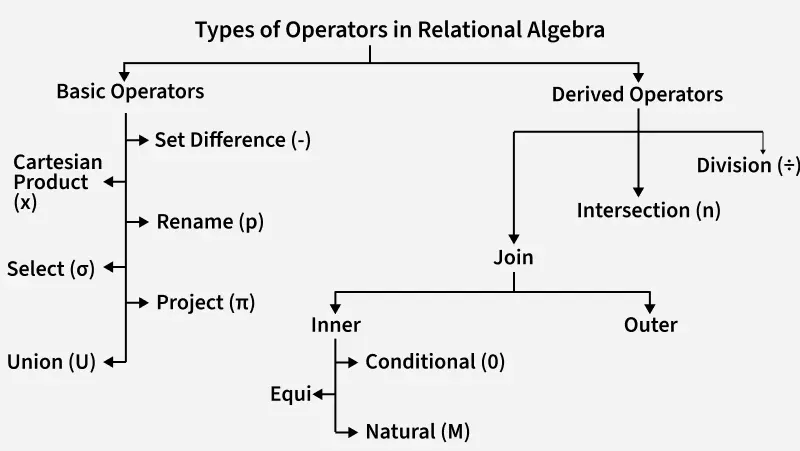
Relational algebra consists of various basic operators that help us to fetch and manipulate data from relational tables in the database to perform certain operations on relational data. Basic operators are fundamental operations that include selection (σ), projection (π), union (U), set difference (−), Cartesian product (×), and rename (ρ).
1. Selection(σ)
The Selection Operation is basically used to filter out rows from a given table based on certain given condition. It basically allows us to retrieve only those rows that match the condition as per condition passed during SQL Query.
Example: If we have a relation R with attributes A, B, and C, and we want to select tuples where C > 3, we write:
| A | B | C |
|---|---|---|
| 1 | 2 | 4 |
| 2 | 2 | 3 |
| 3 | 2 | 3 |
| 4 | 3 | 4 |
σ(c>3)(R) will select the tuples which have c more than 3.
Output:
| A | B | C |
|---|---|---|
| 1 | 2 | 4 |
| 4 | 3 | 4 |
Explanation: The selection operation only filters rows but does not display or change their order. The projection operator is used for displaying specific columns.
2. Projection(π)
While Selection operation works on rows, similarly projection operation of relational algebra works on columns. It basically allows us to pick specific columns from a given relational table based on the given condition and ignoring all the other remaining columns.
Example: Suppose we want columns B and C from Relation R.
π(B,C)(R) will show following columns.
Output:
| B | C |
|---|---|
| 2 | 4 |
| 2 | 3 |
| 3 | 4 |
Explanation: By Default, projection operation removes duplicate values.
3. Union(U)
The Union Operator is basically used to combine the results of two queries into a single result. The only condition is that both queries must return same number of columns with same data types. Union operation in relational algebra is the same as union operation in set theory.
Example: Consider the following table of Students having different optional subjects in their course.
FRENCH
| Student_Name | Roll_Number |
|---|---|
| Ram | 01 |
| Mohan | 02 |
| Vivek | 13 |
| Geeta | 17 |
GERMAN
| Student_Name | Roll_Number |
|---|---|
| Vivek | 13 |
| Geeta | 17 |
| Shyam | 21 |
| Rohan | 25 |
If FRENCH and GERMAN relations represent student names in two subjects, we can combine their student names as follows:
π(Student_Name)(FRENCH) U π(Student_Name)(GERMAN)
Output:
| Student_Name |
|---|
| Ram |
| Mohan |
| Vivek |
| Geeta |
| Shyam |
| Rohan |
Explanation: The only constraint in the union of two relations is that both relations must have the same set of Attributes.
4. Set Difference(-)
Set difference basically provides the rows that are present in one table, but not in another tables. Set Difference in relational algebra is the same set difference operation as in set theory.
Example: To find students enrolled only in FRENCH but not in GERMAN, we write:
π(Student_Name)(FRENCH) - π(Student_Name)(GERMAN)
| Student_Name |
|---|
| Ram |
| Mohan |
Explanation: The only constraint in the Set Difference between two relations is that both relations must have the same set of Attributes.
5. Rename(ρ)
Rename operator basically allows you to give a temporary name to a specific relational table or to its columns. It is very useful when we want to avoid ambiguity, especially in complex Queries. Rename is a unary operation used for renaming attributes of a relation.
Example: We can rename an attribute B in relation R to D
| A | B | C |
|---|---|---|
| 1 | 2 | 4 |
| 2 | 2 | 3 |
| 3 | 2 | 3 |
| 4 | 3 | 4 |
ρ(D/B)R will rename the attribute 'B' of the relation by "D".
Output Table:
| A | D | C |
|---|---|---|
| 1 | 2 | 4 |
| 2 | 2 | 3 |
| 3 | 2 | 3 |
| 4 | 3 | 4 |
6. Cartesian Product(X)
The Cartesian product combines every row of one table with every row of another table, producing all the possible combination. It's mostly used as a precursor to more complex operation like joins. Let’s say A and B, so the cross product between A X B will result in all the attributes of A followed by each attribute of B. Each record of A will pair with every record of B.
Relation A:
| Name | Age | Sex |
|---|---|---|
| Ram | 14 | M |
| Sona | 15 | F |
| Kim | 20 | M |
Relation B:
| ID | Course |
|---|---|
| 1 | DS |
| 2 | DBMS |
Output: If relation A has 3 rows and relation B has 2 rows, the Cartesian product A × B will result in 6 rows.
| Name | Age | Sex | ID | Course |
|---|---|---|---|---|
| Ram | 14 | M | 1 | DS |
| Ram | 14 | M | 2 | DBMS |
| Sona | 15 | F | 1 | DS |
| Sona | 15 | F | 2 | DBMS |
| Kim | 20 | M | 1 | DS |
| Kim | 20 | M | 2 | DBMS |
Explanation: If A has 'n' tuples and B has 'm' tuples then A X B will have 'n*m' tuples.
Derived Operators in Relational Algebra
Derived operators are built using basic operators and include operations like join, intersection, and division. These operators help perform more complex queries by combining basic operations to meet specific data retrieval needs.
1. Join Operators
Join operations in relational algebra combine data from two or more relations based on a related attribute, allowing for more complex queries and data retrieval. Different types of joins include:
1.1 Inner Join
An inner join combines rows from two relations based on a matching condition and only returns rows where there is a match in both relations. If a record in one relation doesn't have a corresponding match in the other, it is excluded from the result. This is the most common type of join.
a. Conditional Join:
- A conditional join is an inner join where the matching condition can involve any comparison operator like equals (
=), greater than (>), etc. - Example: Joining
EmployeesandDepartmentsonDepartmentIDwhereSalary > 50000will return employees in departments with a salary greater than 50,000
b. Equi Join:
- An equi join is a type of conditional join where the condition is specifically equality (
=) between columns from both relations. - Example: Joining
CustomersandOrdersonCustomerIDwhere both relations have this column, returning only matching records.
c. Natural Join:
- A natural join automatically combines relations based on columns with the same name and type, removing duplicate columns in the result. It’s a more efficient way of joining.
- Example: Joining
StudentsandEnrollmentswhereStudentIDis common in both, and the result contains only unique columns.
1.2 Outer Join
An outer join returns all rows from one relation, and the matching rows from the other relation. If there is no match, the result will still include all rows from the outer relation with NULL values in the columns from the unmatched relation.
a. Left Outer Join:
- A left outer join returns all rows from the left relation and the matching rows from the right relation.
- If there is no match, the result will include
NULLvalues for the right relation’s attributes. - Example: Joining
EmployeeswithDepartmentsusing a left outer join ensures all employees are listed, even those who aren't assigned to any department, withNULLvalues for the department columns.
b. Right Outer Join:
- A right outer join returns all rows from the right relation and the matching rows from the left relation.
- If no match exists, the left relation's columns will contain
NULLvalues. - Example: Joining
DepartmentswithEmployeesusing a right outer join includes all departments, even those with no employees assigned, filling unmatched employee columns withNULL.
c. Full Outer Join:
- A full outer join returns all rows when there is a match in either the left or right relation.
- If a row from one relation does not have a match in the other,
NULLvalues are included for the missing side. - Example: Joining
CustomersandOrdersusing a full outer join will return all customers and orders, even if there’s no corresponding order for a customer or no customer for an order.
2. Set Intersection(∩)
Set Intersection basically allows to fetches only those rows of data that are common between two sets of relational tables. Set Intersection in relational algebra is the same set intersection operation in set theory.
Example: Consider the following table of Students having different optional subjects in their course.
Relation FRENCH
| Student_Name | Roll_Number |
|---|---|
| Ram | 01 |
| Mohan | 02 |
| Vivek | 13 |
| Geeta | 17 |
Relation GERMAN
| Student_Name | Roll_Number |
|---|---|
| Vivek | 13 |
| Geeta | 17 |
| Shyam | 21 |
| Rohan | 25 |
From the above table of FRENCH and GERMAN, the Set Intersection is used as follows:
π(Student_Name)(FRENCH ∩ π(Student_Name)(GERMAN)
Output:
| Student_Name |
|---|
| Vivek |
| Geeta |
Explanation: The only constraint in the Set Difference between two relations is that both relations must have the same set of Attributes.
3. Division (÷)
The Division Operator is used to find tuples in one relation that are related to all tuples in another relation. It’s typically used for "for all" queries.
Student_Course (Dividend Table):
Student_ID | Course_ID |
|---|---|
101 | C1 |
101 | C2 |
102 | C1 |
103 | C1 |
103 | C2 |
Course (Divisor Table):
Course_ID |
|---|
C1 |
C2 |
Example: Query is to find students who are enrolled in all courses listed in the Course table. In this case, students must be enrolled in both C1 and C2.
Student_Course(Student_ID, Course_ID)÷ Course(Course_ID)
Output:
Student_ID |
|---|
101 |
103 |
Relational Calculus
Relational calculus is a non-procedural query language used in the context of relational algebra. It focuses on what data to retrieve, rather than how to retrieve it, making it different from relational algebra, which is procedural. In relational calculus, queries are expressed using logical formulas that describe the desired result, without specifying the exact steps to get there.
There are two types of Relational Calculus
- Tuple Relational Calculus(TRC)
- Domain Relational Calculus(DRC)
Comments
Post a Comment